Alt Text Studio · Documentation
How to manage cookie preferences
Change what cookies Alt Text Studio can use, any time, from the footer.
Alt Text Studio uses three kinds of cookies: strictly necessary ones that keep the app working, optional analytics cookies, and optional advertising cookies. Analytics and advertising are separate choices, and you can change either one at any time.
Open Cookie Settings
Click Cookie Settings in the footer of any page (or use the cookie banner shown on your first visit). Both open the same Cookie Preferences panel.
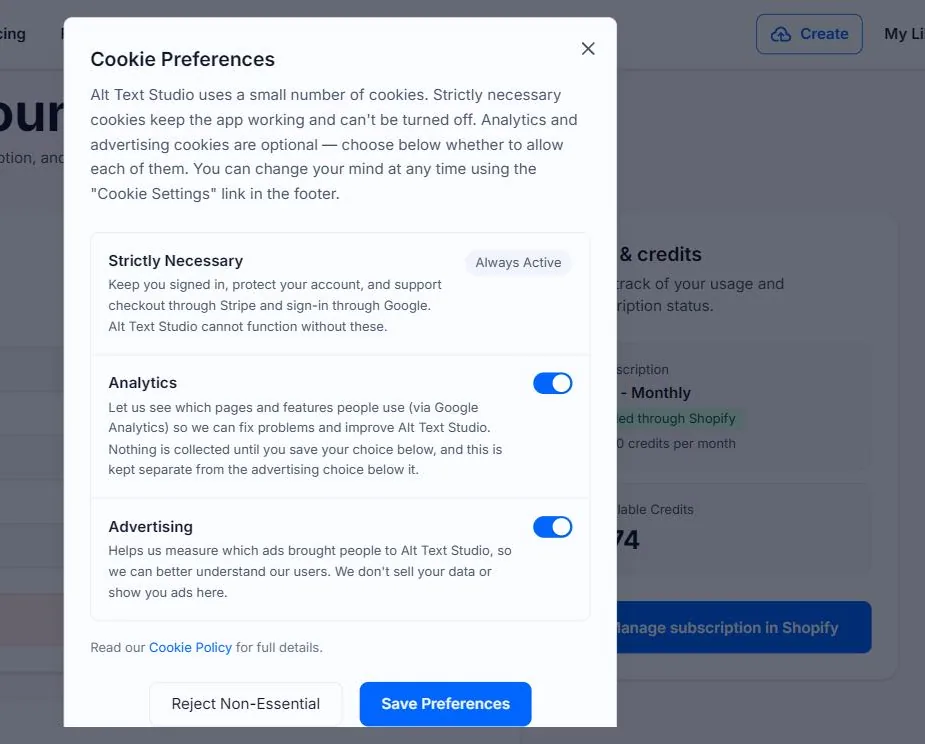
Strictly Necessary — always on
Covers signing in, staying signed in, and checkout through Stripe and Google sign-in. These can't be turned off — the app can't function without them.
Analytics — your choice
Controls whether Google Analytics can run. When on, it helps us see which pages and features people use so we can improve the product. Nothing is collected until you save your choice, and this setting is kept separate from the advertising one below it.
Advertising — your choice
A separate toggle from Analytics. It lets us measure which ads brought people to Alt Text Studio so we can understand our users better. We don't sell your data and we don't show ads inside the app.
Save or reject
Set the Analytics and Advertising toggles how you want them and click Save Preferences, or click Reject Non-Essential to turn both off in one go. Your choice is saved to this browser and applied right away — no page reload needed.
Related guides
- How to switch between light and dark mode— When signed out (homepage toggle) and signed in (Account page toggle).