Alt Text Studio · Documentation
How to delete your account
Permanent. Removes your library, generation defaults, and profile. Walked through with warnings.
Before you delete, make sure account deletion is actually what you want. If you just want to stop being billed, see how to cancel your subscription; you keep your library and remaining credits. If you just want a clean slate without losing the account, see how to erase your entire library. Otherwise, follow the steps below.
Cancel your subscription first (required if you have one)
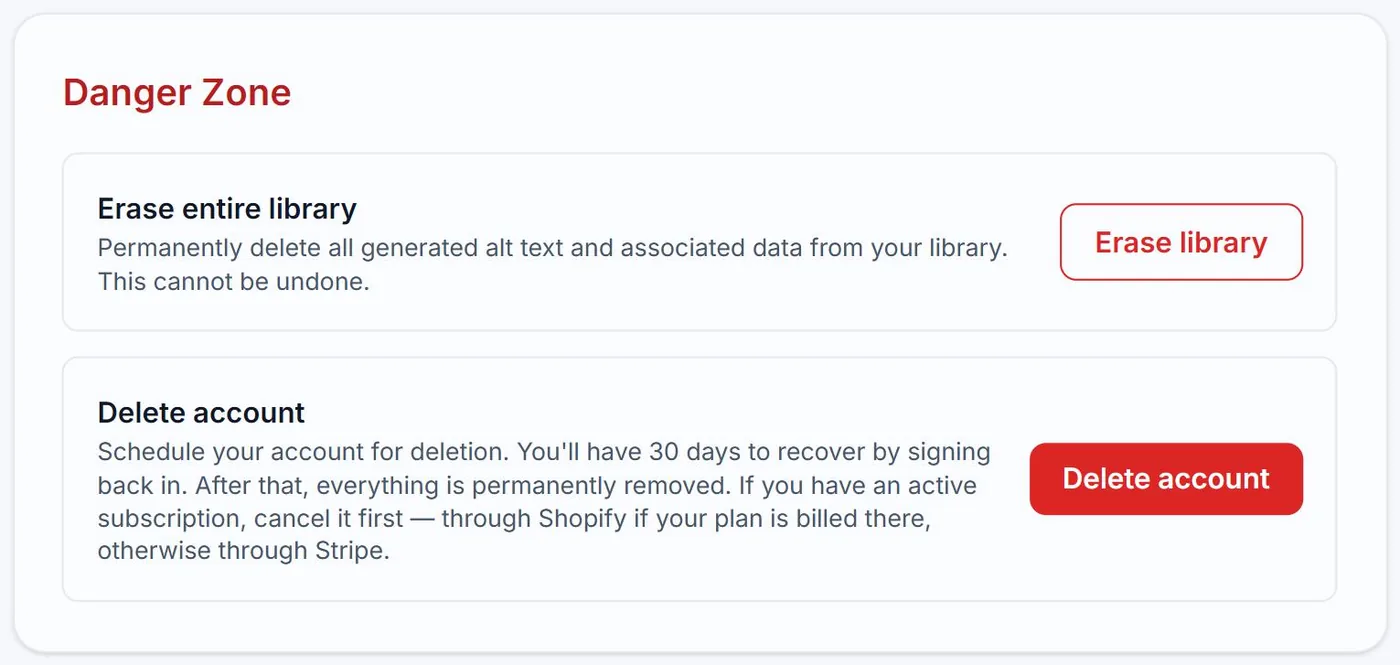
If you have an active paid plan, the Delete account flow will refuse to proceed until it is canceled. Cancel via My Account → Subscription → Manage subscription, which opens the Stripe portal — or the Shopify plan picker if your plan is billed through Shopify. Once the cancellation is confirmed, you can come back and delete the account. Your remaining subscription time and credits stay yours until the current billing period ends, so canceling early doesn't lose them.
Export anything you want to keep
On My Library, export to CSV. Account deletion wipes the library. Once gone, gone.
Open Danger Zone on My Account
Scroll to the bottom of My Account. The Danger Zone section has a Delete account button.
Confirm by typing DELETE (or your password)
OAuth (Google) users have to type DELETE (case-sensitive) into the confirmation input. Email/password users are asked to re-enter their account password instead. The confirm button stays disabled until the input matches.
What happens after
You're signed out immediately, all of your sessions are revoked, and a confirmation email goes to your account address. Your account is scheduled for permanent deletion 30 days later, but during that 30-day window your library, credits, and settings are still intact behind the scenes.
Related guides
- How to cancel your subscription— Self-service cancellation through the Stripe-powered customer portal.
- How to erase your entire Library— Completely empties your library. Cannot be undone. Walked through with warnings.