Alt Text Studio · Documentation
How to add a prefix and suffix
Wrap every alt text with brand markers like "Photo of " or " | Acme".
Prefix and suffix are simple text snippets stitched onto the start and end of every alt text. The AI doesn't see them. They're added after generation.
1
Set a prefix or suffix
You can set prefix and suffix in two places:
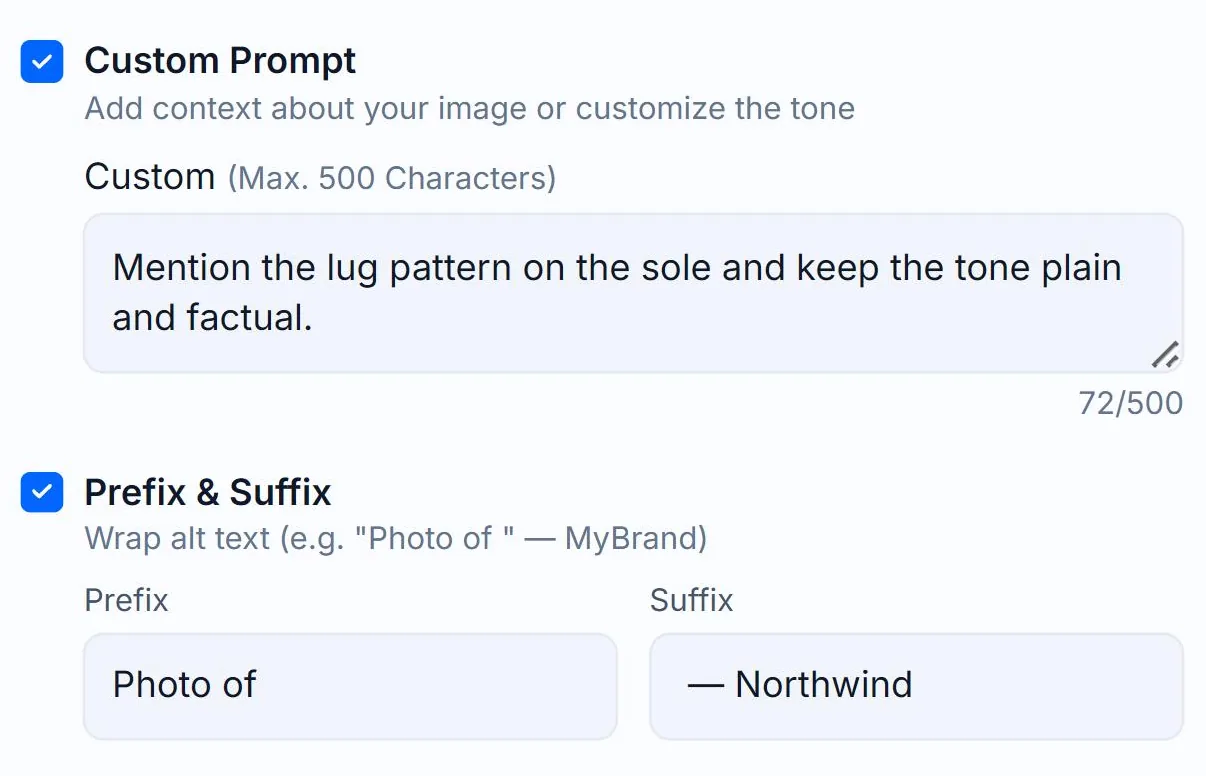
- Per-image — on the Create page, tick the Prefix & Suffix checkbox in the Options panel to expand the Prefix and Suffix text inputs (max 45 chars each).
- App-wide — set them once in Generation Defaults so every new image inherits them.
Examples: prefix Photo of produces *"Photo of a golden retriever..."*. Suffix | Acme Pet Shop produces *"...running through the snow | Acme Pet Shop"*.
2
Common patterns
- Brand attribution: suffix
| YourBrand - Photo credit: suffix
(Photo: John Doe) - Tag for Sorting: prefix
[Product](so you can grep in My Library) - Translations: prefix or suffix per language to match locale convention
3
They count toward total character limits
If you're targeting a short alt text, remember the prefix and suffix count toward the total length. A 20-char prefix leaves less room for the AI's content.
Prefix and suffix are saved per-image, so editing one image's alt text doesn't change the saved prefix/suffix. They re-apply on regeneration.
Related guides
- How to change and save Generation Defaults— Set your preferred options once on the My Account page and Alt Text Studio will use them everywhere.
- How to add a custom prompt— Steer tone or context with free-form instructions to the AI.