Alt Text Studio · Documentation
How to export your library to JSON
Bulk-export your library as a .json file for scripts and other systems.
JSON is the format to pick when something other than a person is going to read the export. Every image keeps its name, URL, language and alt text together, so nothing has to be re-matched on the other end.
Open Export As → .json
On My Library, click Export As and pick .json in the Format row of the panel that opens.
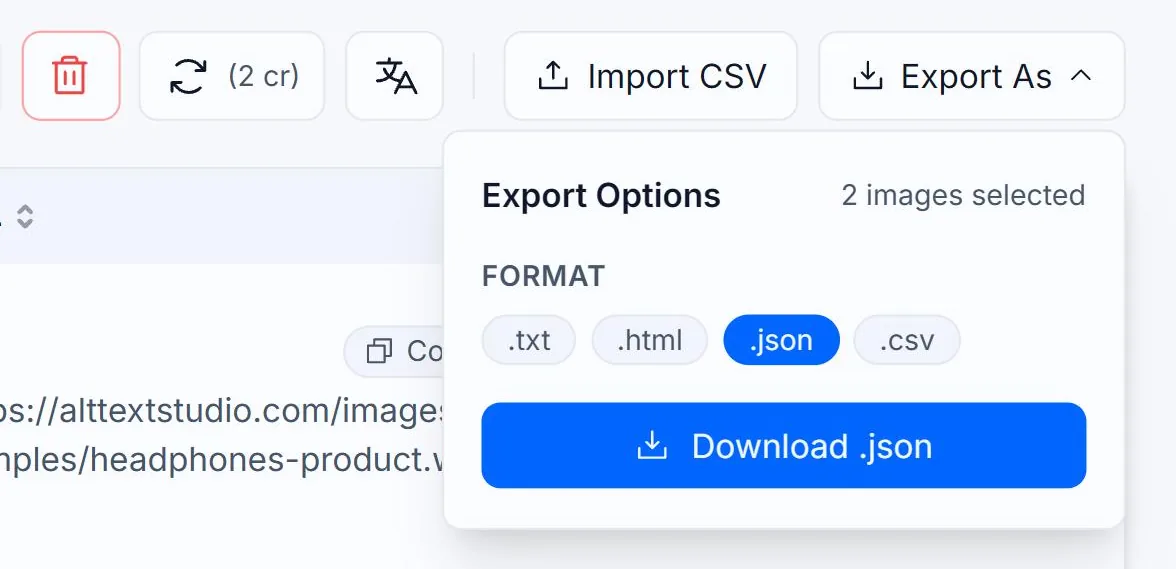
Select the rows you want to export
Tick rows individually, or use the header checkbox to select every row matching your current search and filters (selection works across pages, not just the visible page). To export the whole library, clear search and filters first, then use the header checkbox.

What you get
A .json file containing one object per image, not one per language. Each object has image_name, image_url, created_at, and an alt_text object keyed by ISO 639 language code — the same shape as the JSON you see on a single image's detail page. Uploads show YOUR_IMAGE_URL_HERE in place of a public URL. The optional columns in the panel apply to CSV only; they are not added to the JSON.
[
  {
    "image_name": "headphones-product",
    "image_url": "https://alttextstudio.com/images/examples/headphones-product.webp",
    "created_at": "2026-09-01T18:24:07Z",
    "alt_text": {
      "en": "Over-ear headphones in matte black with cushioned ear pads, resting on a light gray tabletop",
      "es": "Auriculares circumaurales en negro mate con almohadillas acolchadas, sobre una mesa gris claro"
    }
  }
]Large exports arrive by email
Past 500 selected items the panel switches to email mode: the button becomes Email File and a Send export to input pre-fills with your account email. The .json file arrives as an attachment from no-reply@alttextstudio.com. Rate limit: 5 export emails per 10 minutes.
Related guides
- How to export your library to CSV— Bulk-export selected images and chosen columns to a CSV.
- How to save alt text as a .json file— Download a structured JSON object, useful for scripts and pipelines.
- How to copy alt text as JSON— Structured object with image_name, image_url, and per-language alt text.