Alt Text Studio · Documentation
How to import a CSV
Bulk-import images by uploading a CSV. Includes the supported template.
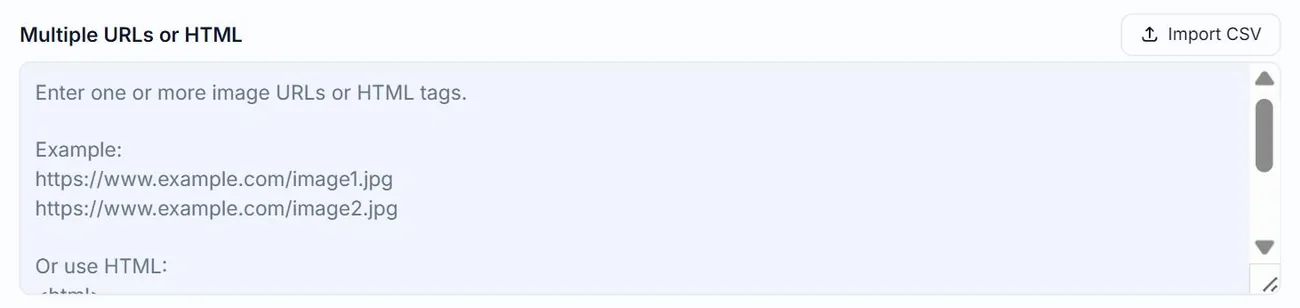
The fastest way to feed Alt Text Studio dozens or hundreds of images is a CSV upload. The columns let you pre-set things like brand, custom prompt, and SEO keywords on a per-row basis, so a single import can drive a fully customised batch.
Two ways to import: generate vs. seed existing
There are two CSV-import flows, and they do different things:
- Generate alt text from a CSV — start from Create and click Import CSV. Each row becomes an image card; click Generate for all to run the AI on every row. This does consume credits.
- Import existing alt text into My Library — start from My Library, click Import CSV, and choose Import existing alt text. Rows are added to your library with whatever alt text was in the
alt_text_xxcolumns; no AI runs and no credits are consumed. Useful for bringing in a back catalog you already wrote.
If you click Import CSV & generate alt text from the My Library import modal, it sends you to the Create page (/create?csv=true) to use the generate flow above.
Get a starter template
Download our CSV template or see the Google Sheets template
The only required column
You only need image_url. Everything else is optional and falls back to your Generation Defaults if missing.
Supported columns
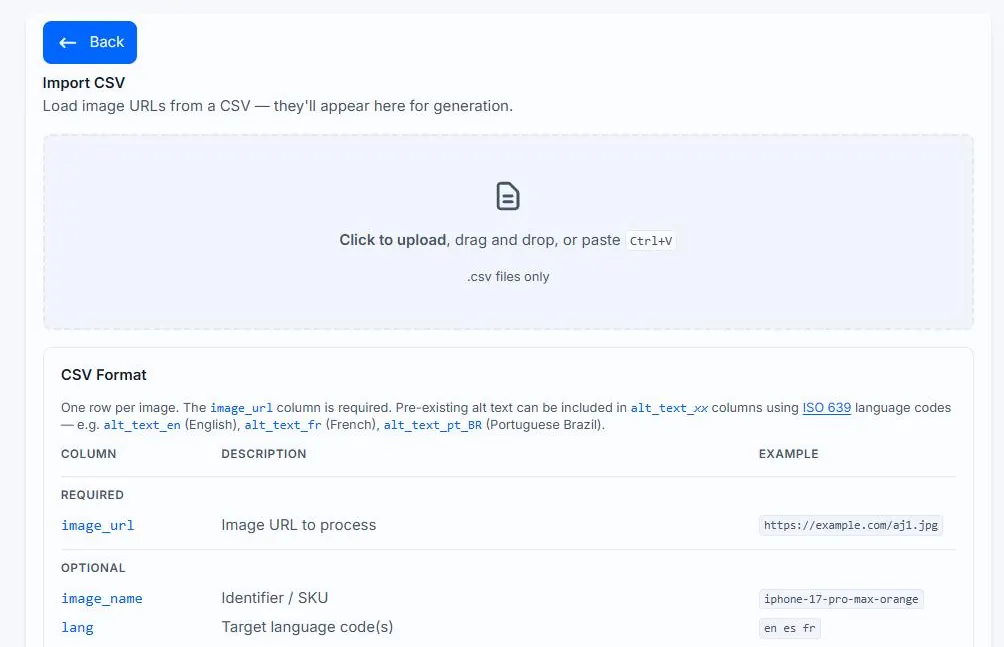
Mirrors the column list shown in the Import CSV modal:
Required
image_url— image URL to process
Optional
image_name— identifier or SKUalt_text_xx— pre-existing alt text per language using ISO 639 codes (alt_text_enfor English,alt_text_frfor French,alt_text_zh_CNfor Chinese Simplified,alt_text_pt_BRfor Brazilian Portuguese)
E-commerce
brand— brand nameproduct— product nameprimary_color— product color
SEO Keywords (max 10 each, separated with | or , — e.g. wireless|noise-cancelling|over-ear or wireless,noise-cancelling,over-ear)
seo_keywordsnegative_keywords
Advanced
custom_prompt— custom instructionstext_length—NormalorDetailed
Switching from another tool? The importer also accepts these legacy aliases: asset_id (→ image_name), ecomm_brand (→ brand), ecomm_product (→ product), ecomm_color (→ primary_color), keywords (→ seo_keywords), and gpt_prompt (→ custom_prompt).
Minimum CSV: just image URLs
If all you have is a list of URLs, that's enough. Empty cells anywhere else are fine — Alt Text Studio falls back to your Generation Defaults for anything missing.
| image_url |
|---|
| https://alttextstudio.com/images/examples/headphones-product.webp |
| https://alttextstudio.com/images/examples/candle-product.webp |
| https://alttextstudio.com/images/examples/scenic.webp |
Seeding existing alt text
When you already have alt text written, put it in alt_text_en (or alt_text_xx for other languages). Pair this with the Import existing alt text flow on My Library to skip generation entirely. Empty alt_text_xx cells just mean that row will be generated by the AI normally.
| image_url | image_name | alt_text_en |
|---|---|---|
| https://alttextstudio.com/images/examples/headphones-product.webp | aeterna-overear | Sleek black over-ear headphones with the brand name "Aeterna" on the ear cup, resting on a light gray surface. |
| https://alttextstudio.com/images/examples/candle-product.webp | amber-glow-candle | A lit "Amber Glow" candle by Hearth & Pine on a stone table, surrounded by vintage books and decorative stones. |
| https://alttextstudio.com/images/examples/scenic.webp | banff-lake-sunrise | A serene lake reflects snow-capped mountains and evergreen trees at sunrise, with mist hovering over the water and a small red boat at the shore. |
Customising per-row
Mix and match: e-commerce details for product photos, custom prompts for tone, longer text length for hero shots. Leave any cell blank to fall back to your defaults.
| image_url | image_name | brand | product | primary_color | custom_prompt | text_length |
|---|---|---|---|---|---|---|
| https://alttextstudio.com/images/examples/headphones-product.webp | aeterna-overear | Aeterna | Over-Ear Headphones | Black | Mention the brand name visible on the ear cup | Detailed |
| https://alttextstudio.com/images/examples/candle-product.webp | amber-glow-candle | Hearth & Pine | Amber Glow Candle | Amber | Lead with material and scent | Normal |
| https://alttextstudio.com/images/examples/scenic.webp | banff-lake-sunrise | — | — | — | Describe lighting and atmosphere | Detailed |
Upload the file
Back on Create, drop the .csv onto the Import CSV zone (or click to pick it). Each row becomes a card in the batch with preview, options, and the seeded alt text where applicable. You can still tweak per-image options before clicking Generate for all.
Notes
UTF-8 encoding. The seo_keywords and negative_keywords columns accept either pipe (|) or comma (,) as the separator.
Related guides
- How to link multiple image URLs— Paste a list of image URLs to process them in a single batch.
- How to export your library to CSV— Bulk-export selected images and chosen columns to a CSV.
- How to change and save Generation Defaults— Set your preferred options once on the My Account page and Alt Text Studio will use them everywhere.