Alt Text Studio · Documentation
How to add SEO keywords
Bias the AI toward keywords you want to rank for.
SEO keywords are search terms you want to incorporate naturally into the alt text. The AI weaves them in only when they fit the image. No keyword stuffing.
Add keywords on the Create page
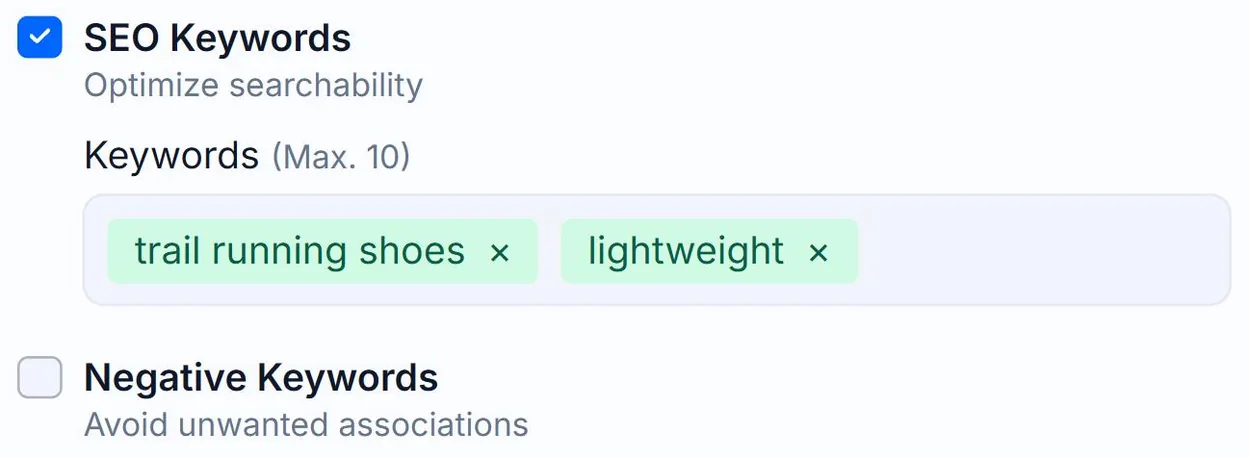
On the Create page, tick the SEO Keywords checkbox in the Options panel to expand a chips input. Type a keyword and press Enter or Space to add it. Up to 10 keywords per image.
Or save them as defaults
You can save the current keywords (and any other options) as account defaults from two places:
- The Save as Default Settings button at the bottom of the Options panel on Create, which appears once you've changed something.
- The Generation Defaults form on My Account.
Either way, every new image inherits them.
How the AI handles them
The keywords are appended to the prompt with instructions: *"Try to incorporate these keywords if relevant to the image. Do not force them if they don't fit."* The model will skip keywords that don't match what it sees.
Related guides
- How to add negative keywords— Words to keep out of the generated alt text.
- How to add a custom prompt— Steer tone or context with free-form instructions to the AI.
- How to change and save Generation Defaults— Set your preferred options once on the My Account page and Alt Text Studio will use them everywhere.