Google Images drives roughly a fifth of all searches on the web, and that is before you count product carousels, AI Overviews, and the rich-result snippets that pull a thumbnail in next to your blue link. If your images are uncompressed, unlabeled, or invisible to crawlers, you are leaving a meaningful slice of organic traffic on the table.
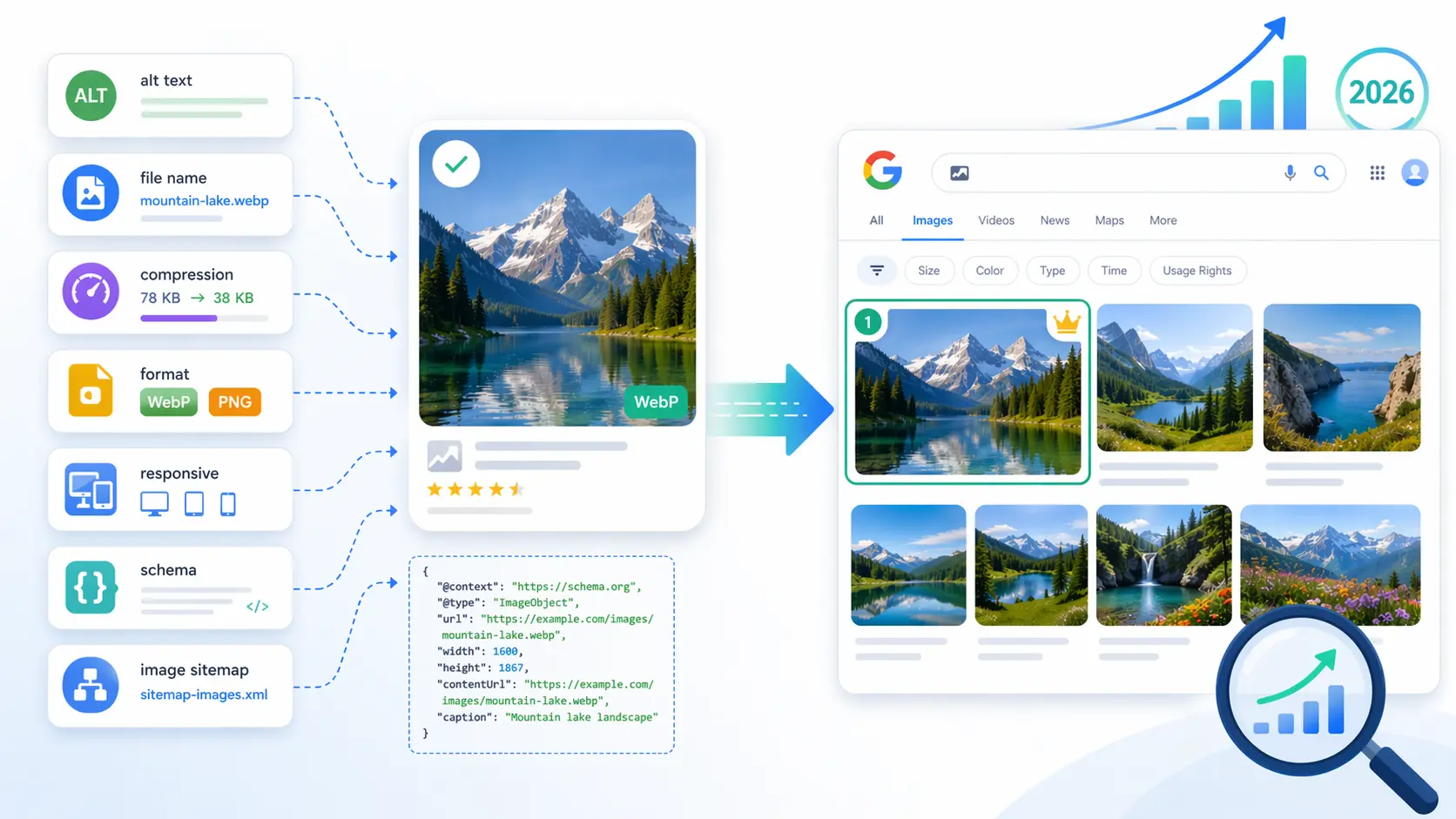
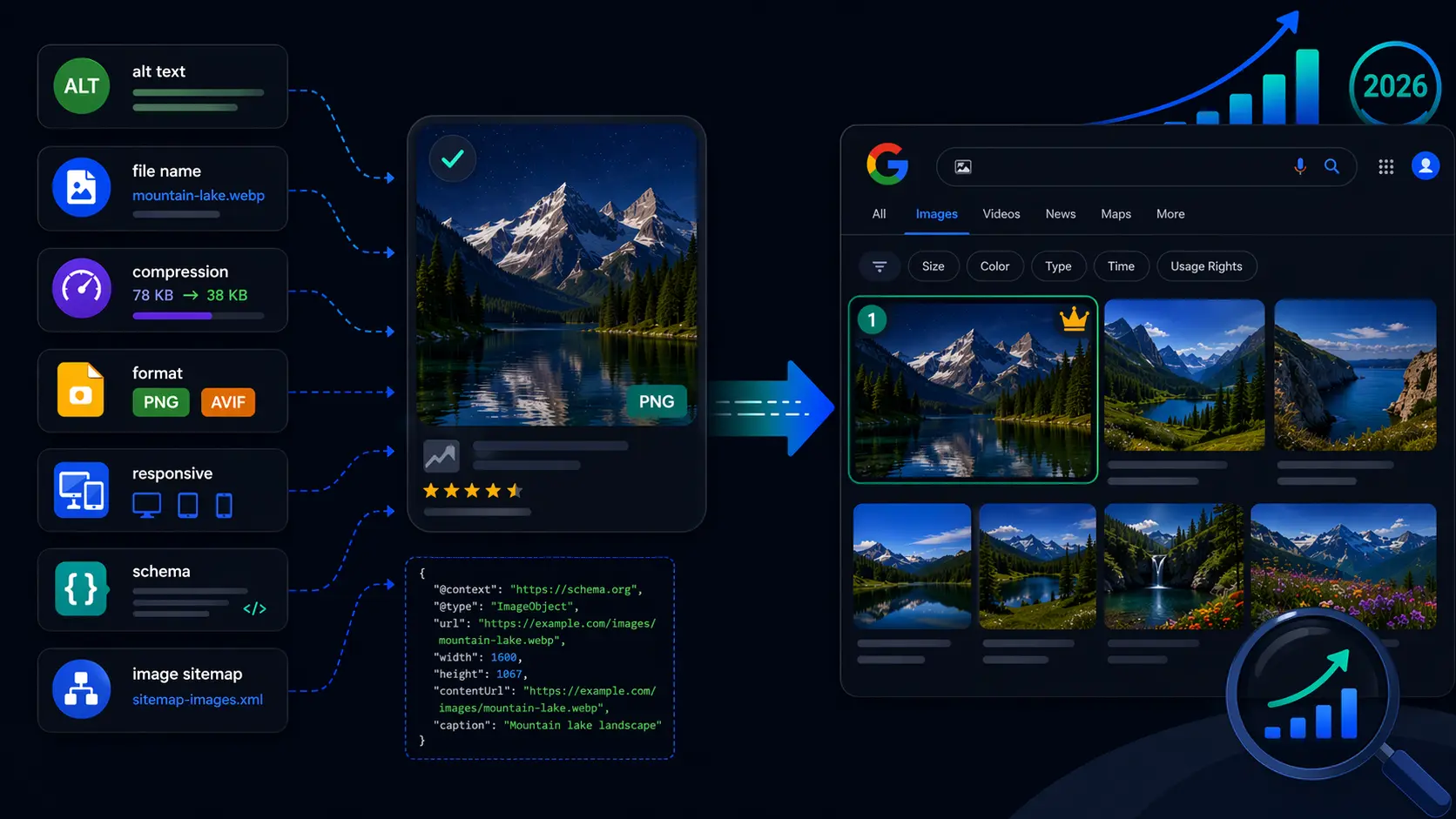
This guide walks through the image SEO checklist we run on every site we audit: file names, formats, compression, responsive markup, alt text, structured data, and image sitemaps. It draws on Google's own Image SEO and image structured data guidance, plus what we have seen actually move rankings in 2026 as AI search reshapes the funnel.
Summary
Image SEO is the practice of making the images on your site discoverable, crawlable, and rankable in Google Images, AI Overviews, and on-page rich results. The big levers are: descriptive file names, modern formats (WebP or AVIF), properly compressed file sizes, responsive srcset markup with native lazy loading, accurate alt text on every meaningful image, surrounding context that matches the image, ImageObject structured data where it applies, and an image sitemap so nothing gets missed. Of these, alt text and page context drive the largest share of image search ranking gains, while format and compression protect Core Web Vitals scores that gate every other ranking signal.
What is image SEO?
Image SEO is the process of optimizing the images on your site so that search engines can find them, understand what they show, and surface them in image search, web search, and AI-generated answers. It touches three layers:
- Technical: file format, file size, dimensions, responsive markup, lazy loading, CDN delivery.
- On-page: file name, alt text, captions, the text that surrounds the image, the heading hierarchy of the page.
- Discovery: structured data, image sitemaps, internal linking, and making sure crawlers are not blocked from your image folders.
Get all three right and Google can render a fast page, understand what each image depicts, and confidently rank it. Get any one wrong and the others stop compounding.
Why image SEO matters more in 2026
Search has changed shape. The same query that returned ten blue links five years ago now returns an AI Overview, a product carousel with images, a "People also ask" panel, and a row of Google Images thumbnails. Visual results compete with text for the same screen real estate, and often win.
- Visual discovery is mainstream. Google Lens handles billions of visual searches every month, and Google Images remains the second-largest search property after Google Web Search.
- AI Overviews pull images. Google's AI Overviews regularly include thumbnails sourced from indexed images. Pages with strong image signals get cited; pages with broken or missing alt text do not.
- Core Web Vitals gate rankings. Largest Contentful Paint (LCP) is almost always an image. A poorly optimized hero image can tank your scores across the entire site.
- Ecommerce relies on it. Shopping results, product rich snippets, and Merchant Center listings all need clean, structured, accessible image data.
- Accessibility overlaps with SEO. Every accessibility-driven change you make to images (alt text, contrast, semantic markup) also improves SEO, and vice versa.
File names and URL structure
Google explicitly recommends descriptive file names. The URL path is one of the few signals available before the page is even rendered, and it shows up in image search snippets.
Bad
/uploads/IMG_4872_final-v2.jpgGood
/products/nike-air-max-90-white-grey-side.webpWhy: the second URL tells Google (and Alt Text Studio's auto-context detector) the brand, product, color, and angle before a single byte of the image is decoded.
Rules of thumb
- Use lowercase letters and hyphens. Avoid spaces, underscores, and capital letters.
- Describe the content, not the workflow. "hero-banner-final-v3.jpg" is internal trivia; "sourdough-loaf-on-cooling-rack.jpg" is signal.
- Keep file names short but specific. Three to seven hyphenated words is a good range.
- Reuse the same canonical URL for the same image. Reuploading under a new filename throws away every link and indexing signal you had.
- Group images into folders that mirror your site structure (
/images/blog/,/images/products/) so crawlers can map the topical hierarchy.
Pick the right image format
The format you choose determines file size, render quality, and browser compatibility. In 2026 the answer is almost always WebP for photography and UI imagery, with AVIF as a higher-compression option where toolchain support is there, and SVG for logos and icons.
| Format | Best for | Notes |
|---|---|---|
| WebP | Photos, hero images, screenshots, ecommerce product shots | 25–35% smaller than JPEG at equivalent quality. Universal browser support. |
| AVIF | High-traffic hero images where every kilobyte matters | Up to 50% smaller than JPEG. Encoder is slower; use as a progressive enhancement with a WebP fallback. |
| JPEG | Legacy fallback only | Fine if you need the broadest possible compatibility; otherwise WebP wins. |
| PNG | Screenshots with sharp text, images requiring transparency | Use lossless WebP instead when possible — same transparency, smaller files. |
| SVG | Logos, icons, illustrations | Tiny, infinitely scalable. Always include a <title> for accessibility. |
| GIF | Almost never | Use a muted, looping MP4 or WebM video instead — typically 10x smaller. |
Use the <picture> element when you want to serve AVIF to browsers that support it and fall back to WebP for everything else:
<picture>
  <source srcset="/images/hero.avif" type="image/avif">
  <source srcset="/images/hero.webp" type="image/webp">
  <img
    src="/images/hero.jpg"
    alt="Sourdough loaf on a wire cooling rack with steam rising"
    width="1200"
    height="630"
    loading="lazy"
  />
</picture>
Compression and file size
Page weight directly affects Largest Contentful Paint, and LCP is part of Google's Core Web Vitals. A bloated hero image drags down your ranking on every keyword the page targets, not just image search.
- Target: aim for hero images under 200 KB and inline content images under 100 KB. Above-the-fold imagery should ideally render in under 2.5 seconds on a mid-tier mobile device.
- Resize before compression. Most "image SEO is hard" complaints come from sites serving 4000-pixel-wide originals into a 600-pixel slot. Resize first, compress second.
- Use the right encoder settings. WebP at quality 75–82 is visually indistinguishable from the original for almost all photography. AVIF at quality 50–60 is similar.
- Strip unnecessary metadata. Camera EXIF data and ICC profiles can add 50+ KB to a single image. Tools like
imagemin,squoosh, or your CDN's image API will strip them automatically. - Audit with Lighthouse. Chrome's Lighthouse panel flags every oversized image with a specific savings number. Fix the biggest offenders first.
Responsive images and lazy loading
Serving the same image to a phone and a 4K monitor wastes bandwidth in both directions. The native HTML solution is srcset and sizes:
<img
  src="/images/product-800.webp"
  srcset="
    /images/product-400.webp   400w,
    /images/product-800.webp   800w,
    /images/product-1600.webp 1600w
  "
  sizes="(max-width: 600px) 100vw, 800px"
  alt="Hand-thrown ceramic mug in matte sage green, 12oz, three-quarter view"
  width="800"
  height="800"
  loading="lazy"
  decoding="async"
/>- Always declare width and height. Without them the browser cannot reserve space, which causes Cumulative Layout Shift (another Core Web Vital).
- Use
loading="lazy"for below-the-fold images. Native lazy loading is supported in every major browser and requires zero JavaScript. - Do not lazy-load your LCP image. The hero image at the top of the page should load eagerly. Lazy-loading it tells the browser to deprioritize it, which is the opposite of what you want.
- Add
decoding="async"on non-critical images to keep image decoding off the main thread. - Use a CDN with image transformations. Cloudflare Images, Cloudinary, imgix, and Bunny.net can generate the WebP/AVIF variants and the right sizes on demand from a single source file.
Alt text: the highest-ROI image signal
If you only fix one thing on this list, fix alt text. Google has been explicit for over a decade that the alt attribute is a primary ranking signal for image search, and the WebAIM Million study finds that over a third of all images on the web still lack it. That is unusual leverage: a fixable signal most of your competitors are getting wrong.
Good image SEO alt text is descriptive, specific, keyword-aware without being keyword-stuffed, and matches the surrounding context. We have a complete walkthrough in What is Alt Text? The Complete Guide, but the short version:
- Describe what the image actually shows. "A golden retriever puppy on a wooden park bench", not "dog".
- Include the relevant keyword only if it accurately describes the image.
- For products, include the brand, product name, and distinguishing attributes — these match how shoppers actually search.
- Skip the prefix "image of" or "photo of"; screen readers already announce the element type.
- Use empty
alt=""on decorative images so they are skipped, not announced as "graphic." - Write unique alt text for every meaningful image. Duplicating descriptions across a gallery wastes the signal.
Write better alt text in seconds — for every image on your site
Format and compression are one-time engineering work. Alt text is the one signal that has to be written for every image, forever — and it is the one competitors are getting wrong. Alt Text Studio uses leading AI vision models to generate accurate, SEO-aware descriptions in seconds. Drop in one image or a thousand, layer in product context or target keywords, translate into 194 languages, and export as CSV, JSON, HTML, or plain text.
Captions and surrounding context
Google's image documentation calls out captions, page title, and the text that immediately surrounds an image as ranking signals. Crawlers use the page context to validate alt text and to understand images that have none. A photo of a sneaker placed next to a paragraph about hiking boots is going to confuse the model.
- Use real captions. A caption beneath the image is read by users and indexed by search engines. The HTML5
<figure>and<figcaption>elements are the semantic way to do it. - Keep alt text and captions different. A caption usually adds context ("Mt. Hood from the Timberline trail, August 2025"); alt text describes what is in the frame ("A snow-capped Mt. Hood under a clear blue sky").
- Place images near relevant text. An image embedded in the section that talks about it ranks better than one shoved into a sidebar.
- Use the
titleattribute sparingly. It is mostly a tooltip; do not rely on it as a substitute for alt text.
Structured data for images
Schema.org markup is how you tell Google explicitly what an image represents and what rich-result types it can appear in. The three highest-ROI types are:
Product schema
Required for product rich results in Google Search and Shopping. Include image as an array of high-resolution URLs (Google recommends multiple aspect ratios: 1:1, 4:3, 16:9). Pair with offers, aggregateRating, and brand for the full rich snippet.
Article schema (with image)
Adds a thumbnail to your blog posts in search and AI Overviews. Use 1200x630 or larger and make sure the image is crawlable.
ImageObject with license metadata
Google added support for image license metadata to surface licensing information directly in Google Images. If you sell stock or want attribution preserved, this is the schema to use.
A minimal Article example with image:
{
  "@context": "https://schema.org",
  "@type": "Article",
  "headline": "Sourdough Crust Troubleshooting",
  "image": [
    "https://example.com/images/loaf-1x1.webp",
    "https://example.com/images/loaf-4x3.webp",
    "https://example.com/images/loaf-16x9.webp"
  ],
  "datePublished": "2026-04-22"
}
Image sitemaps
An image sitemap helps Google discover images it might otherwise miss — those loaded by JavaScript, rendered from a CDN with an unusual hostname, or buried deep in paginated archives. You can either extend your existing XML sitemap with the image:image namespace, or publish a separate sitemap.
<urlset xmlns="http://www.sitemaps.org/schemas/sitemap/0.9"
        xmlns:image="http://www.google.com/schemas/sitemap-image/1.1">
  <url>
    <loc>https://example.com/blog/sourdough</loc>
    <image:image>
      <image:loc>https://example.com/images/loaf.webp</image:loc>
    </image:image>
  </url>
</urlset>- Make sure your
robots.txtdoes not block the image folder. A surprising number of "missing from Google Images" cases come down to a staleDisallow: /images/rule. - Submit the sitemap in Google Search Console and watch the Image indexing report.
- If you serve images from a separate hostname (a CDN), verify that hostname in Search Console too.
Optimizing for AI search and Google Lens
AI Overviews, ChatGPT search, Perplexity, and Google Lens are all multimodal — they read both the image and the text describing it. They depend even more on alt text and surrounding context than traditional crawlers do, because they are trying to synthesize an answer, not just match a query.
- Treat alt text as a semantic anchor. Even multimodal models cross-reference alt text against the visual data to resolve ambiguity.
- Lead with direct answers. AI engines pull the first 40–60 words after a heading. If your image illustrates a how-to step, put the step description directly above or below the image.
- Use FAQ schema where it fits. Pages with FAQ markup are cited at higher rates by AI Overviews.
- Do not block reputable AI crawlers if you want them to cite you.
OAI-SearchBot,PerplexityBot, andClaudeBotare the cite-and-link kind, not the train-only kind.
We go deeper on this in our guide to Generative Engine Optimization (GEO).
Common image SEO mistakes
Lazy-loading the hero image
Adding loading="lazy" to the LCP image hurts Core Web Vitals. Lazy-load below-the-fold only.
Background images doing the work of <img>
CSS background-image is invisible to image search. If the image carries information, use a real <img>.
Reusing the same alt text across a product gallery
Each angle, color, and zoom should have its own description. "front view", "side view", "close-up of stitching".
Keyword-stuffed alt text
"buy cheap running shoes online running shoes sale running shoes 2026" is spam. Google ignores it; screen reader users hate it.
Serving 4000-pixel originals to mobile
Resize and use srcset. Mobile users do not need a print-resolution image.
No width or height attributes
Causes layout shift, hurts Cumulative Layout Shift scores. Always declare them, even when CSS overrides them.
Blocking /images/ in robots.txt
Easy to do by accident, devastating for image search visibility. Audit it.
The image SEO checklist
A copy-paste checklist for every image you publish.
- ✓Descriptive, lowercase, hyphenated file name
- ✓Modern format (WebP or AVIF) with a sensible fallback
- ✓Resized to the maximum size it will display at, then compressed
- ✓Under 200 KB for hero, under 100 KB for inline
- ✓
srcset+sizesfor responsive delivery - ✓Explicit
widthandheight - ✓
loading="lazy"below the fold (never on LCP) - ✓Unique, descriptive alt text — or empty alt for decorative images
- ✓Caption with
<figure>+<figcaption>if the image needs additional context - ✓Placed near the relevant body text, not floating in a sidebar
- ✓Structured data (Product / Article / ImageObject) where applicable
- ✓Image folder unblocked in robots.txt
- ✓Image sitemap submitted to Search Console
Frequently asked questions
What is image SEO?
Image SEO is the practice of optimizing the images on your website so they can be discovered, understood, and ranked by search engines. It includes file naming, format choice, compression, responsive markup, alt text, structured data, and image sitemaps.
Does image SEO still matter in 2026?
More than ever. Google Images is still the second-largest search property, AI Overviews regularly include image thumbnails, and image weight is the dominant factor in Largest Contentful Paint. Multimodal AI engines like ChatGPT search and Perplexity also rely heavily on alt text to understand and cite your content.
What is the best image format for SEO?
WebP for almost everything photographic in 2026. AVIF is even smaller and worth using as a progressive enhancement on high-traffic pages. SVG for logos and icons. Use PNG only when you need transparency in a context where lossless WebP is not an option, and avoid GIF — a muted MP4 or WebM is much smaller.
How big should images be for SEO?
Aim for hero images under 200 KB and inline content images under 100 KB. The actual pixel dimensions should match the largest size the image will display at, with a srcset serving smaller variants to smaller screens.
How important is alt text for SEO?
Alt text is a confirmed Google ranking signal for image search and contributes to overall page topical relevance. It is also the single most-cited accessibility violation on the web, so fixing it pays double dividends.
Do I need an image sitemap?
If your images are loaded by JavaScript, served from a separate CDN hostname, or buried in paginated archives, yes. A traditional static-HTML site usually does not need one, but adding it costs nothing and helps Google discover image variants faster.
Will AI-generated alt text hurt my SEO?
No, as long as the descriptions are accurate. Google does not penalize AI-generated alt text any more than it penalizes AI-generated body copy. The standard is whether the description actually matches the image and helps users. Modern vision models meet that bar comfortably, especially when given context like product names or target keywords.
Start generating alt text today
Format, compression, and responsive markup are usually a one-time engineering investment. Alt text is the ongoing one — and the one that compounds across image search, AI Overviews, and accessibility compliance. Whether you have ten product photos or ten thousand, the fastest way to close the gap is to let AI vision draft the descriptions for you, then refine the few that need a human touch.